
I write code on three fronts at once. There is school, with Epitech projects like  Homepedia or Seavia. There is freelance work, mostly
 Wondday. And there are personal projects:
 Blocker,
 Stremlist, and a slightly embarrassing number of tools I wrote only so my agents could work better.
I read Domenic Denicola's post about his agentic coding setup and recognized myself in almost every line. Agents on Linux, work that continues when you close the laptop, config synced across machines, parallel worktrees, and fixing a bug from your phone on a train. But my setup also covers another need. My agents don't only write code: they sign in to websites, create API keys, click through annoying dashboards and French government sites. And each time they need a credential from my vault or a shell on my Mac, they ask me, and I approve with Face ID.
So here is my setup, as of November 2026. It will probably be out of date in three months. That's what time capsules are for.
My requirements
- Agents run on Linux, not macOS.
- Work continues when I close the Mac, and I can pick it up from my iPhone.
- Several providers (Claude and Codex) on several machines, in one interface.
- The same config (instructions, skills, MCP servers) on every machine, editable from any of them.
- Agents can do web chores, including on sites that need a sign-in, without me pasting my passwords into a chat.
- My vault and a shell on my Mac need my explicit approval, in one gesture: Face ID or Touch ID.
- Many agents in parallel, without the machine falling over.
- I keep Windows for games.
The ingredients
Summary: three machines connected by Tailscale (my Mac, a dual-boot tower that Home Assistant turns on when needed, and a free Oracle VM), T3 Code and Rex as interfaces, Syncthing for config, Composio for MCP, a stealth fork of agent-browser for the web, and vault-approver, a small service of mine that keeps my Bitwarden vault behind Face ID.


The machines
Why not the Mac
Running agents on macOS is painful. Dozens of node_modules folders and worktrees written at the same time made my Mac crawl, and I'm not the only one who noticed.
I tried for a long time anyway. I even wrote agent-awake, a daemon that keeps the Mac awake while an agent works. It allows sleep if the Mac gets too hot or if the battery drops below 10%. I also started building a fallback to my iPhone's hotspot for when the Wi-Fi drops, though that part still needs a real test. The rest works very well. But when you start writing a root daemon to keep your laptop awake, maybe the laptop is not the right place.
The Mac keeps what only it can do: iOS builds, simulators, and computer use, when an agent must drive a desktop app that agent-browser can't reach. Almost everything else moved off it. (A Mac mini under the desk would fix that last part too. If anyone at Apple reads this, I'm easy to reach.)
The tower: a gaming PC that is also a server
I already had a desktop PC for games, with an RTX 5070. It now dual-boots: Windows for games, Ubuntu for agents. Over time, it costs much less than a VPS with the same power: the machine is already paid for, so only the electricity is left. The obvious problem: how do you turn on a PC remotely, and more importantly, pick which OS it boots?
The answer: a smart plug, driven by Home Assistant, and a small CLI called tour (French for "tower") that my agents on the Mac can use.
tour exec --cwd /home/leo/code/wondday 'bun install'
tour on windows
tour off
tour exec turns the machine on if needed, picks Ubuntu (and reboots Windows into Ubuntu if I'm playing: too bad for me), waits until SSH answers, then runs the command. tour on windows does the opposite in the evening. tour off asks for a clean shutdown, waits for the power draw to drop, then cuts the plug.
Home Assistant itself runs on an Intel NUC with Home Assistant OS, a mini PC I bought second-hand for very little. It stays on all the time and uses almost no power. For this job, it's much more reliable than a Raspberry Pi, and better value too.
A few details cost me some evenings.
Home Assistant keeps the plug off for at least 45 seconds before it turns it back on. On one faster attempt, the plug came back on, but the motherboard stayed off.
I also cut the GRUB menu to one second, so the boot doesn't wait for a choice nobody makes. And a cold start takes 90 seconds on average from the command to the first SSH connection (across two dozen boots, yes, I measured).
On the Ubuntu side, a Linux version of agent-awake shuts the tower down after two hours without activity, and ignores services that always run, like Rex. Without it, the tower and its RTX 5070 would stay on all night for an agent that finished at 11 PM, and my electricity bill would show it.
One last thing: dev servers stay on 127.0.0.1. An nftables rule exposes each local port above 1023 on the tailnet only. When an agent starts a server on localhost:3000 on the tower, I open it as http://tour:3000 from the Mac or the iPhone, with nothing to configure. Domenic uses Portless for this. I use it too, on top of the firewall rule, for stable names instead of port numbers.
The Oracle VM: always free, always on
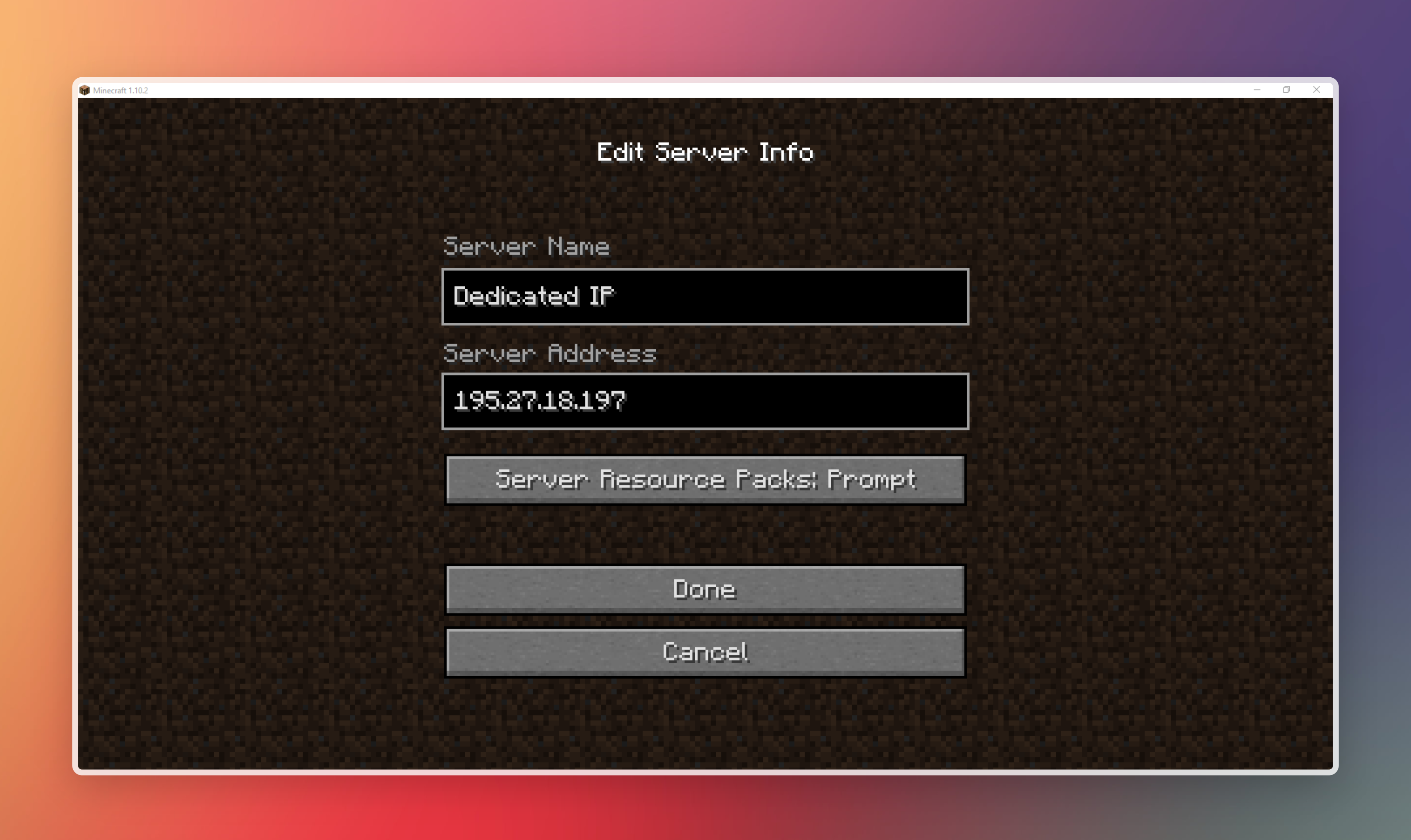
Some things must depend neither on the tower (which shuts down) nor on the Mac (which I close). They go on an ARM VM from Oracle's Always Free tier, the same offer I used for my Minecraft server. Two cores, 11 GB of RAM, free forever, on the tailnet. That's where vault-approver lives (more on that below), along with the T3 Code and Rex servers and the small services that must run day and night.
Tailscale, the glue
Domenic already explains very well why Tailscale is magic, so I won't do it again. I'll just add that everything a bit sensitive listens only on the tailnet: Syncthing listens only on each machine's Tailscale IP, and vault-approver even has its own node, separate from the rest of the VM.
This matters even more lately, with a new vulnerability exploited at scale roughly every week. The fewer ports open to the internet, the fewer doors to force. I keep only the few that a public service needs, and nothing sensitive is reachable outside the tailnet.
The interfaces
T3 Code
T3 Code is an ADE, an agent development environment: like an IDE, but for directing agents instead of writing code. For me, it's the best way to work with agents today.
The main reason: it is multi-machine by design. My Mac, the tower and the Oracle VM are environments in the same interface. I start a Claude thread on the tower and a Codex thread on the Oracle VM, follow them from the Mac, then from the iPhone on the train. Each thread has its own worktree, and an agent can hand a task to another provider when that makes sense.
And the UX and UI are a clear step above the rest. That sounds minor, but it's the tool I open a hundred times a day.
One thing Domenic also covers: approvals. My agents run without permission prompts. The access that matters most (my vault, a shell on my Mac) goes through another path, described below.
Rex
For terminals, I use Rex, the new terminal from Superlogical, Mitchell Hashimoto's company (HashiCorp, Ghostty). It's a terminal and a multiplexer in one app: sessions keep running on the server when I close the window, and I can get back to any session on my three machines in two seconds, from the Mac or the iPhone.
Domenic found tmux clunky for this use case. I agree, and Rex is exactly what I wanted instead. It's still in beta, and I already recommend it highly.
One config for three machines
With three machines, instructions, skills and MCP servers drift apart very quickly.
So I have one global instructions file, ~/.agents/AGENTS.md:
~/.claude/CLAUDE.mdcontains only@~/.agents/AGENTS.md.~/.codex/AGENTS.mdis a symlink to the same file.
Claude and Codex read exactly the same rules.
Syncthing syncs ~/.agents, ~/.claude, ~/.codex and the MCP secret store, both ways, in a few seconds. I edit a skill on the tower, and it's on the Mac before I switch windows.
In these folders, Syncthing copies only the files on a strict list. Sessions, caches and CLI tokens stay on their machine. Syncthing also doesn't use the public servers that help devices find each other and relay their traffic: it talks only to the three known devices, over Tailscale.
A small confession, in the spirit of Domenic's "learning a new CLI and configuring it just so: too much work". At first I built a real configuration manager, with plan, apply, rollback and pinned versions for every tool. It shipped a frozen copy of my skills, which went stale as soon as I changed something locally. I replaced all of it with Syncthing and a bootstrap script that installs the same packages and declares the same MCP servers on each machine. Much less impressive, and it works much better.
Syncthing also copies the agents' browser sessions (cookies and site sign-ins) between the three machines. I used Mutagen for that until recently. Now Syncthing does everything.
Context: one MCP server for all my accounts
I have seven Linear workspaces (personal, Wondday, Blocker, Stremlist, and three Epitech projects), two Gmail accounts, three Resend accounts, three Supabase projects, plus PostHog, Sentry, Vercel, Stripe... With one MCP server per service and per account, the agent's context window is full before the first question.
Composio fixes that: one MCP server, several accounts per app, and tool search on demand. The agent loads a tool's schema only when it needs it.
My addition: a SessionStart hook, shared by Claude and Codex, that injects the list of active connections with their aliases at the start of each session, and flags the expired ones. It gives a line like this one (shortened):
Use Composio MCP tools for: linear (leo-hq, seavia, wondday, blocker, …), gmail (…), posthog (blocker), sentry, vercel, …
The agent knows what to search for and in which workspace, without a single schema in context.
Letting agents do the dirty work of the web
This is where my setup differs most from Domenic's, and honestly the part I'm happiest with.
The problem
A good part of my "computer time" was not code. It was creating an API key in a dashboard, clicking through three menus to find a setting, filling in a government form on a site that was clearly designed to make you give up. Repetitive chores I was tired of.
My favorite example: I often take the train with MAX JEUNE, the SNCF subscription that gives under-28s €0 seats on French high-speed trains. Each MAX ticket must be confirmed by hand, one or two days before departure. Every single time. It drove me crazy.
Now a scheduled job does it for me. Every hour during the day, it opens my MAX account in a real Chrome, confirms the tickets that are due, and checks that their status changed. The best part: I don't think about it anymore.
Then I got carried away. A booking MCP server reuses that script for confirmations. For the rest, it talks to SNCF Connect through an extension in my browser: an agent can search, book and cancel tickets, and even swap a ticket for a better train as soon as a seat frees up. I also learned that DataDome, SNCF Connect's anti-bot, blocked me after about two hours at 120 requests per hour. We now stay around 40 requests per hour.
A stealth fork of agent-browser
For the web in general, my agents use agent-browser. The problem: anti-bot services spot it. Cloudflare Turnstile and others detect the CDP Runtime domain that the tool turns on for every page.
My fork turns Runtime on only when the agent asks for the console. The rest is configuration:
- Chrome always runs with a real window, never headless. On the Mac, the window opens without taking focus. On Linux, in a virtual display.
- On the tower, Chrome uses Vulkan, so the real RTX 5070 handles WebGL. Anti-bot services notice a browser without WebGL.
- Cookies from my personal Chrome are imported into each new session.
And one strict rule in the instructions: if a site shows a bot check, the agent stops and tells me. It doesn't reload in a loop, and it doesn't try to solve the challenge.
vault-approver: Bitwarden behind Face ID
That leaves the real problem: signing in. I didn't want to give my passwords to agents, or type them myself each time. So I wrote vault-approver, a small service that runs on the Oracle VM and guards my Bitwarden vault. It talks to the vault through the Bitwarden CLI.
Bitwarden seems to be working on something similar: a draft pull request for agent access approvals is open in their iOS app. Nothing has shipped yet, and I needed it now, so I built it myself.
The flow looks like this:
- The agent asks vault-approver whether there is an entry for the site. It gets the account names, never a secret, and I get no notification.
- It requests the sign-in and tells me in the chat.
- I get a push notification on my iPhone and my Mac.
- I open the web app (reachable only on the tailnet), check the site and the account, and approve with Face ID or Touch ID.
- The sign-in happens. If the site then asks for a TOTP code, the same Face ID approval stays valid for five minutes: the browser extension fills in the code without a new request.
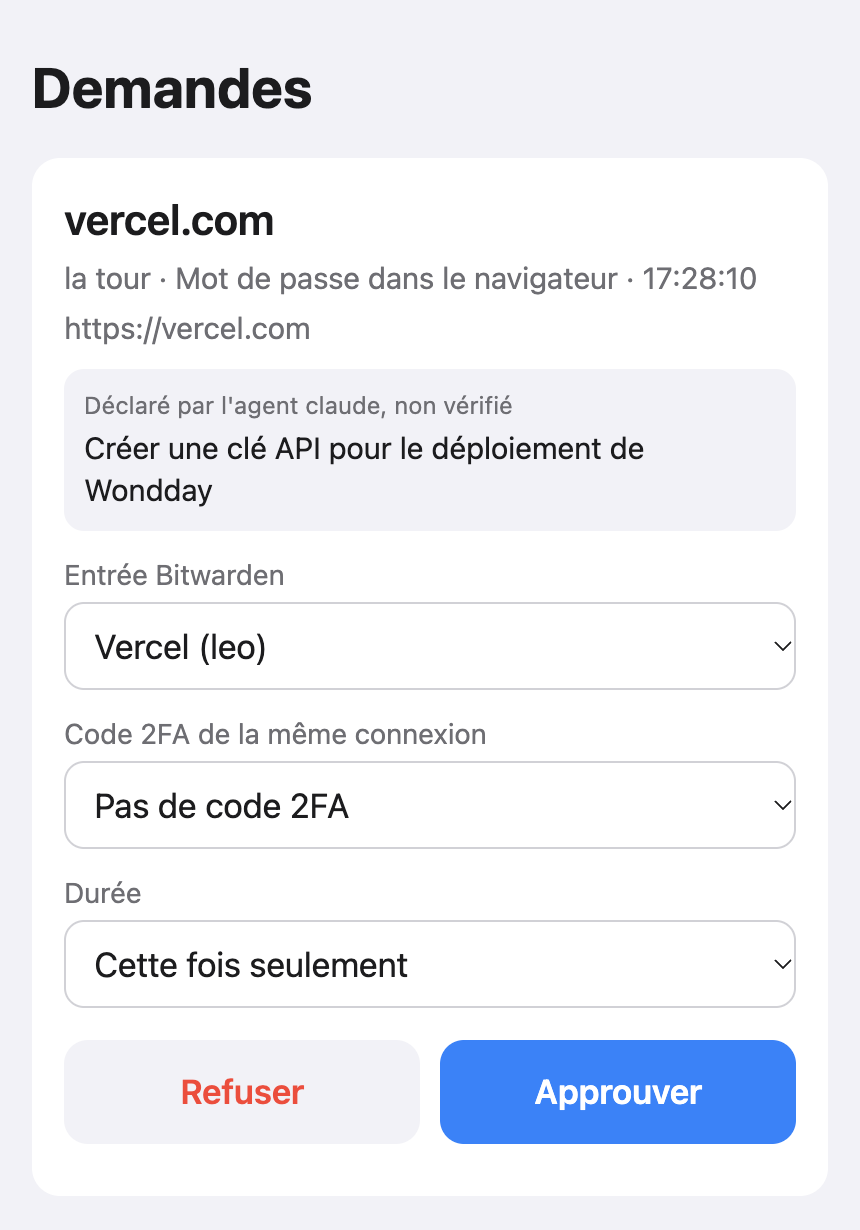
This is what a request looks like on my iPhone. I pick the Bitwarden entry, the 2FA code if there is one, and how long the access lasts. The reason comes from the agent, and the page says it is not verified.
Passkeys are even better. The private key never leaves vault-approver: after Face ID, it signs the site's request, and a relay loaded in Chrome for that sign-in only passes the signature on.
On the technical side, the vault is locked by default. vault-approver keeps only my master password, encrypted with a key that only my vault-approver passkey can reproduce, with Face ID or Touch ID, through the WebAuthn PRF extension. Each approval opens the vault for that access, one hour at most, then locks it again. I checked that PRF works on my devices with a small prototype before I built the rest.
The Mac doesn't need to be on: everything goes through the Oracle VM. So I can approve from my iPhone a sign-in requested by an agent on the tower, while the Mac sleeps in my bag.
Temporary access to the Mac
Sometimes an agent on the tower needs the Mac, for example for an iOS build. It asks with a reason and a duration:
mac request --for 2h --reason "Run the Wondday iOS build"Same web app, same Face ID. The Mac then authorizes an SSH key made for that request only, for 24 hours at most. When the access expires or when I revoke it, its sessions close.
Is this safe?
Not completely.
What it protects: the vault, and the decision of what leaves it. Nothing leaves without Face ID or Touch ID, and every decision is logged.
What it doesn't protect: a secret once it's delivered. To fill a form, the password reaches the browser extension on the agent's machine. A hostile agent could read it. The same goes for cookies: my Chrome sign-ins reach the agents without Face ID, and a hostile agent could use them.
But in practice, it's much better than the alternative, which was pasting my passwords into a chat or doing everything by hand.
The real bottleneck: CPU, RAM and disk
This is what surprised me. With many agents in parallel, the model is no longer what limits me. The machine is. Ten worktrees means ten node_modules folders, ten dev servers, and ten lint runs that start at the same time when each agent checks its work.
Two levers help.
Faster tools. In my recent projects, oxlint and oxfmt replace ESLint and Prettier, and Vite+ puts lint, format and tests behind one vp command. Bun everywhere, with bun check instead of tsc: the same type errors, on all CPU cores. One script runs lint, types and tests.
When ten agents run their checks, the gap between a lint that takes a few hundred milliseconds and one that takes twenty seconds adds up to minutes of saturated CPU.
Memory budgets. On the tower, T3 agents and Docker containers have separate memory budgets (cgroups), so a hungry container can't kill my agents.
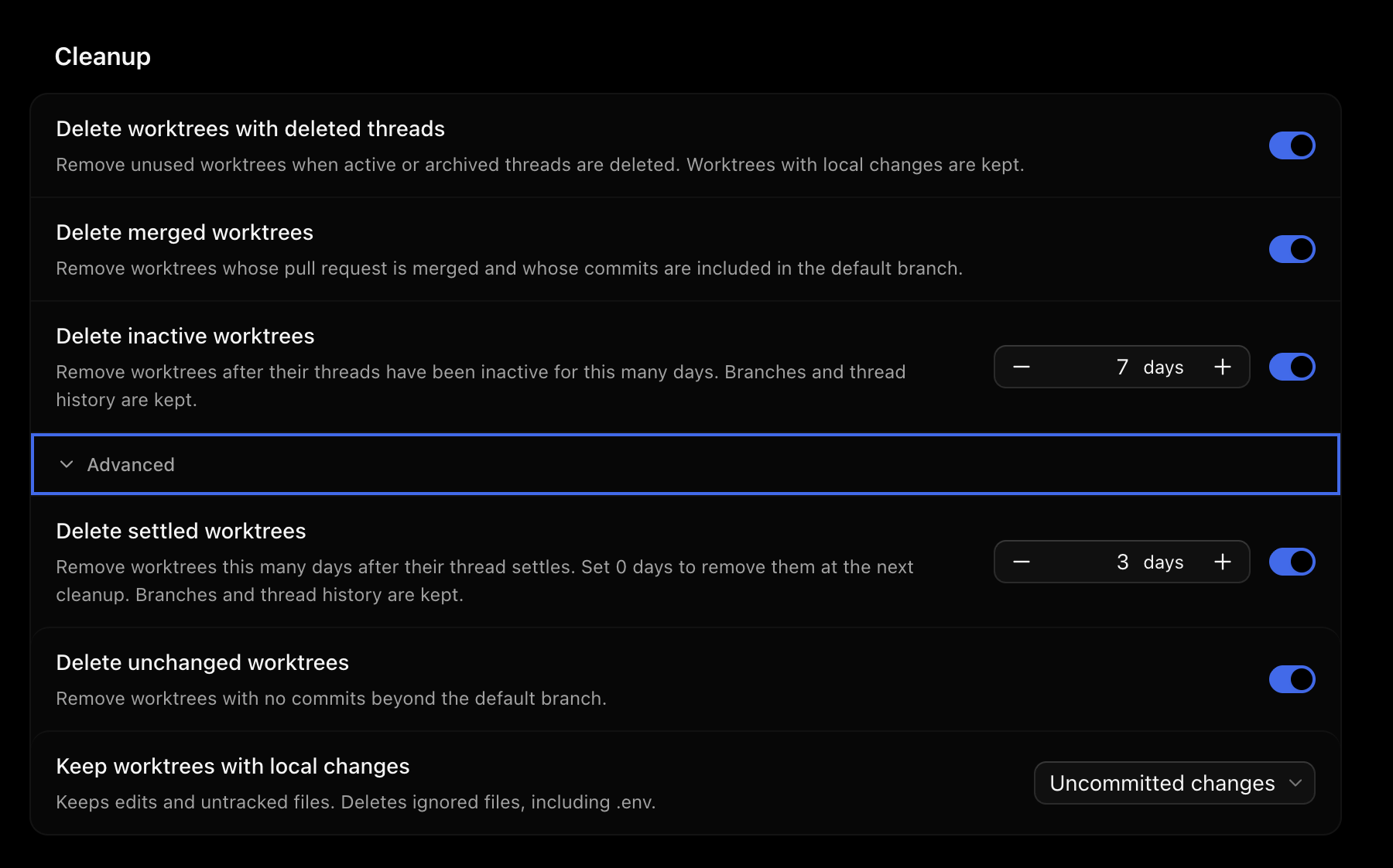
That leaves the disk. Worktrees pile up and take a crazy amount of space. Here T3 Code's cleanup settings help a lot: it deletes the worktrees of deleted threads, those whose PR is merged, those inactive for seven days, and those with no commits beyond the default branch. Worktrees with local changes stay.
My coding workflow
I tried several ways to structure the agents' work. For example poteto-mode, the working style of Lauren Tan (poteto), from their pstack, ported to T3 Code. It was far too much for me: every thread spawned an army of subagents and took forever.
Today it's much simpler. I use Theo's tstack and Matt Pocock's skills. A few I call by name:
grill-with-docsbefore a big task. The agent interviews me about the plan, a few questions per round, each with the answer it recommends, until no decision is left. It looks up the facts itself and asks me only for the decisions. As it goes, it writes down the vocabulary of the project and the decisions we made (ADRs), so the next agent doesn't ask me again.full sendwhen I leave a thread alone. The agent owns the task until the PR is merged: it finishes the change, proves that it works, opens the PR, watches CI and the review bots, fixes what they find, and merges when everything is green.full stopis the same, but the agent stops when the PR is ready. I do the merge myself.councilwhen I want a second opinion. The agent sends the work to two reviewers, a Claude model and a Codex model, and each gives a score out of 10. It fixes what it agrees with and asks them again, until both are satisfied. The scores go in the PR description.file-prfor every pull request. The title says why the change matters, and the description starts with the problem, not with a list of files. For a visible change, it callsbefore-and-after, a skill of mine, which captures every UI state that changed, before and after the PR, and puts the images in the description. I review the PR with the pictures right there.
A few rules in AGENTS.md do the rest: Conventional Commits, links to Linear issues with the right keywords, and production deployed only through the Git integration after a reviewed PR. There is even a hook that makes the agent rewrite its answer if it contains an em dash. I'll let you guess why.
My frontend workflow
For design, three tools:
- Emil Kowalski's skills on animation and interface polish. They give agents real taste for details: the right curves, the right durations, what should not animate at all.
- The Mobbin MCP server, to find real screen and flow references instead of making things up.
- The
prototypeskill, also by Emil Kowalski. I describe a component or a flow, and the agent builds several genuinely different versions behind a visual picker. I flip through them in the browser, pick one, and the agent integrates only the winner.
The hover previews in this post and on the home page started that way. It's recursive, I know.
For mobile, Argent lets agents control iOS simulators, Android emulators, and even my physical iPhone and Android phone: tap, scroll, take screenshots, and profile on the simulators. The simulators run on the Mac, and an agent on the tower drives them over Tailscale. The agent tests its own work on a simulator or on a real phone.
Bonus: from the iPhone
A typical evening, my version of Domenic's train story:
- On the TGV, a message from a client: a bug on a page.
- I open T3 Code on the iPhone and start a thread on the tower, still on from the afternoon.
- The agent needs to sign in to a dashboard to read the logs. Notification, Face ID, done.
- It fixes the bug, checks it with its before and after screenshots, and opens the PR.
- I review the PR on my phone, merge, and the Git integration deploys.
I never took the Mac out of my bag. I love living in the future.
Recap and what's still missing
That's my setup:
- A dual-boot tower, powered on by Home Assistant, so agents run on Linux without giving up games.
- A free Oracle VM for everything that must stay on.
- T3 Code and Rex to drive it all from the Mac or the iPhone.
- Syncthing for one config, editable anywhere.
- Composio for one MCP server instead of twenty.
- An agent-browser fork and vault-approver so agents can handle websites, with Face ID as the key.
- Fast tools, memory budgets and worktree cleanup so it all holds up in parallel.
- A few skills and Argent so agents finish their work and prove it.
What's still missing: a way to spread heavy tasks between the tower and the Oracle VM based on load. And websites that stop asking for an SMS code in 2026.
Three machines, two providers, and a lot of Face ID. Let's talk again in three months.
